NOVI AMS
AMS Connect makes connecting to NOVI AMS SSO via oAuth2.0 a breeze.
API Credentials
In order to set up the NOVI SSO, you will need to collect the following credentials from your AMS point of contact:
- NOVI Base URL - This is the base URL of your NOVI environment. It is typically a subdomain in the production environment and a subdomain of the
novistaging.comdomain in the staging environment. - Client ID - The Client ID of the oAuth2.0 integration.
- Client Secret - The Client Secret of the oAuth2.0 integration.
- My Account URL [Optional] - This will allow you to override the default path that the "My Account" button links to. The default is the
/member-compasspath of the NOVI Base URL.
These credentials will allow you to set up the SSO. Optionally, you may also provide the My Account URL to override the default account link destination.
Logout Redirect
You may want to add a logout redirect on your NOVI account that logs the user out of the WordPress website and redirects them to the home page. The AMS Connect for WP dashboard has a widget called "Important Links" which has a copy-able link called Single Logout URL. Provide this URL to your NOVI point of contact and request them to set it as the logout redirect.
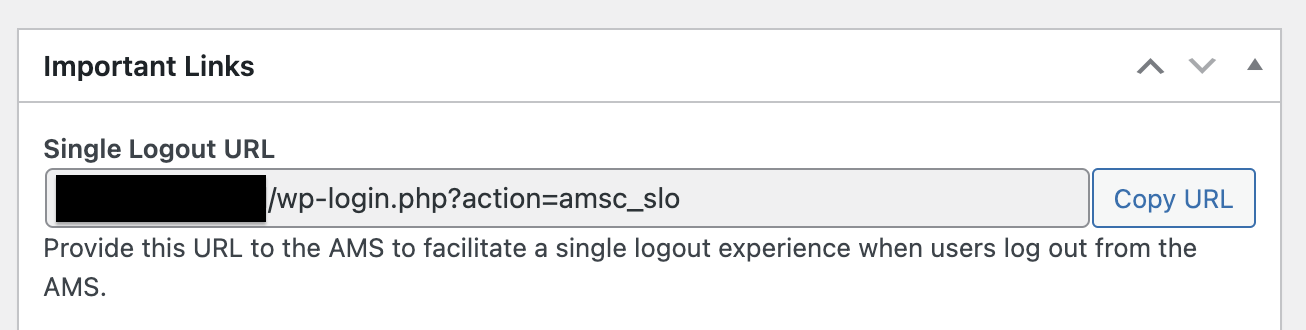
This url will end the user's current session on the WordPress website and redirect them back to the home page. This is an excellent way to ensure the user has no open sessions after they have explicitly logged out of their NOVI profile.
Limitations
The current NOVI AMS implementation contains the following limitations:
- SSO support for oAuth2.0 login flow only
Coming Soon
- Roles mapped based on Membership Type